How to tailor your resume to a job description
To tailor your resume to a job description, reword and reorder what you already did so the employer's requirements are easy to find. Read the posting, list what it asks for, match each item to a real line of your resume, then rewrite your summary, bullets and skills around those matches.
The hard part is adding nothing you cannot back up. When we tested our own tailoring step, the AI put two skills into a resume because the posting asked for them, though the person had never listed either. Below are the seven steps the career guides share, with the checks we built after that test.
Step 1. Read the whole posting and keep its text
Read the posting to the end before you change a word. The title tells you little. The responsibilities and requirements tell you what the reader will look for, and a hard requirement can sit anywhere, including the last line: a license, a location, a work permit.
Read it twice: once for what the job is, once for the words the employer uses for it. Then keep the full text somewhere. Job pages come down, and you will want the exact wording again when you prepare for the interview.
In hiredby.app, Tailor for a job takes the job link or the pasted description. The app fetches a link from its own server, with no account of yours, so a page behind a login cannot be read. When a page returns under 300 characters of text, the app says so and switches to a paste box. Pasting works in any language.
Step 2. List the requirements and mark the must-haves
Go through the posting line by line and write down each thing it asks for: skills, tools, years of experience, certifications, the kind of work. Then split the list. Must-haves are the lines that say required, must, or give a hard number. Nice-to-haves say preferred, a plus or bonus.
Keep the list short. The report in hiredby.app stops at 10 requirements and weighs a must-have twice as much as a nice-to-have. Its match score is the weight your resume already shows, divided by the total weight, times 100. A requirement you show in other words counts half, and one you do not show counts zero. To see which of a posting's keywords your resume already uses, paste both into the free resume keyword scanner.
Step 3. Match each requirement to a line you can prove
For each requirement, find the line of your resume that proves it. You will get three kinds of answer: shown, where the line is already there; reworded, where you did it but called it something else; and missing. Note which line goes with which requirement, because steps 5 and 6 use it.
The hiredby.app report does this matching and shows the quoted line next to each requirement. Code then checks the quote. If that line is not really in your resume, the requirement is marked "Not found", whatever the AI claimed. For each missing requirement the report asks you one question, and a question you leave open counts as a no: "Left out. We won't claim it."
Reading the posting and the report are free.
Step 4. Rewrite the summary for this job
The summary is the first thing a reader sees. Name the role you are applying for and your two or three strongest matches from step 3, in two or three lines. Use the posting's name for the role in the summary: if it says "product designer", write "product designer", not an internal title nobody outside your last company knows.
Posting:  Product designer for our payments app
Before:   Designer with experience across web and mobile projects
After:    Product designer for web and mobile apps; redesigned the checkout flow at Acme
The checkout work was already in the experience section. The new summary only moves it to the top, where a reader looking for payments work sees it first.
Step 5. Reword and reorder your bullets
Move the bullets that match must-haves to the top of each job, and use the posting's words for work you really did. Bullets that match nothing can get shorter or go. Cut before you pad: a short page where the matches sit on top reads better than a long one where they are buried.
One line, before and after:
Posting:  Experience building or maintaining a design system
Before:   Looked after the shared buttons, forms and colors of the web app
After:    Maintained the web app's design system: shared buttons, forms and color tokens
The work is the same. The new line uses the posting's term, so a reader scanning for "design system" finds it.
What tailoring must not do is add results. Ask a model to rewrite "Handled support tickets" and it may answer "Cut support tickets by 40%". hiredby.app checks every number in an AI line against what you wrote, finds no 40, and keeps your line. The same check drops a number borrowed from a neighboring bullet or from the posting itself.
Step 6. Adjust the skills section
Use the posting's name for each skill you have. If it says "PostgreSQL" and you wrote "Postgres", match it. Put the must-haves first, and if the posting groups its skills, such as languages, tools and methods, group yours the same way so each match is easy to see.
Leave out every skill you do not have, even when the posting asks for it. In our eval of 2026-11-15, the tailoring step on its balanced setting added Go and Kubernetes to a skills line because the posting listed them, and the resume never had them. We changed the tailoring rules after that run: a skill, tool or term that your resumes and answers do not have stays out, and the report asks you about it instead.
Step 7. Compare with your base resume, then proofread
Before you send it, read the tailored copy against your base resume, change by change, then check it as a file:
- Every changed line is still true, and you could talk about it in an interview.
- Names, dates, titles and contact details match your other copies.
- The company name is right everywhere, and nothing written for another application slipped in.
- The PDF has selectable text. Select a line in it: selectable text is what a parser needs.
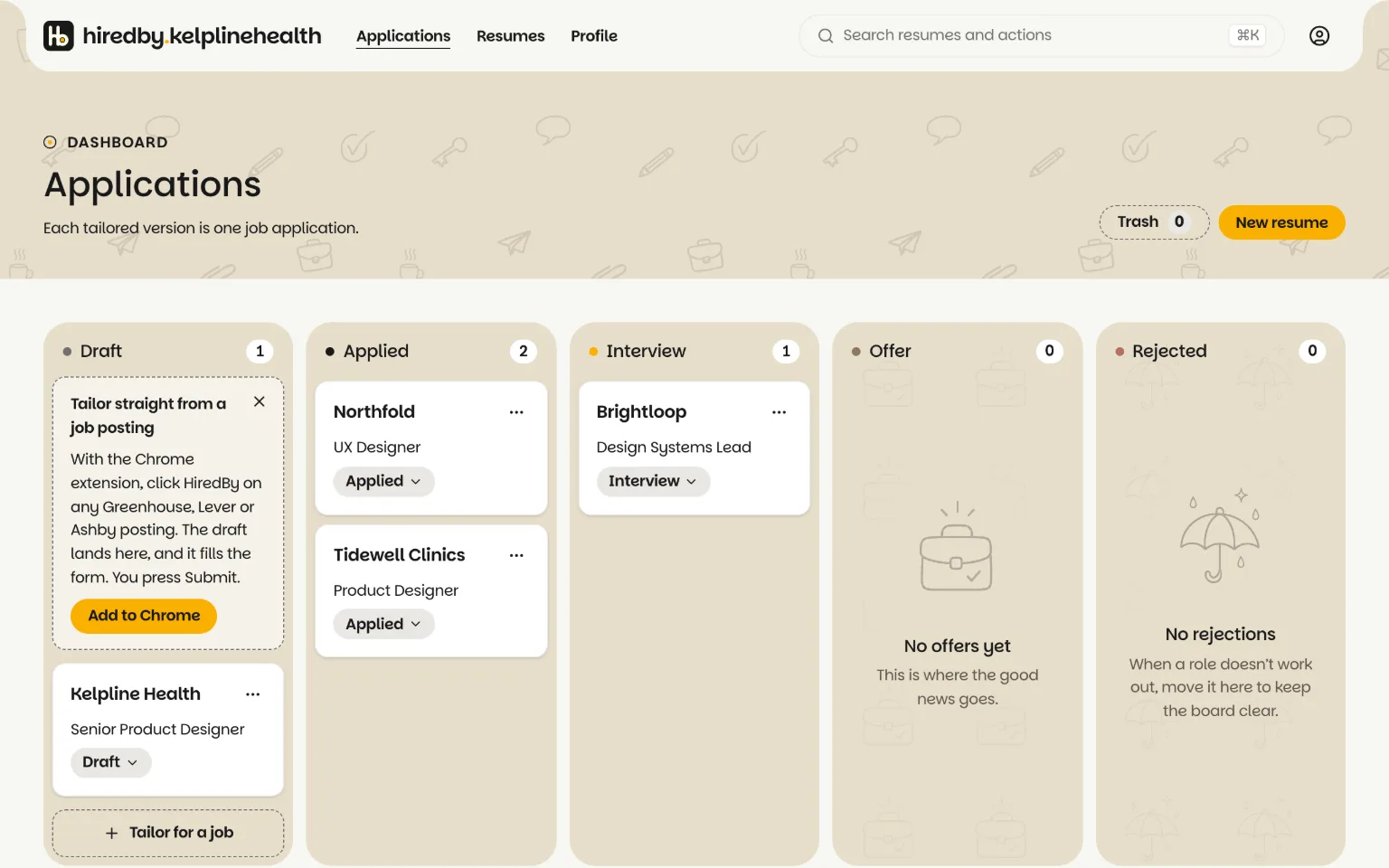
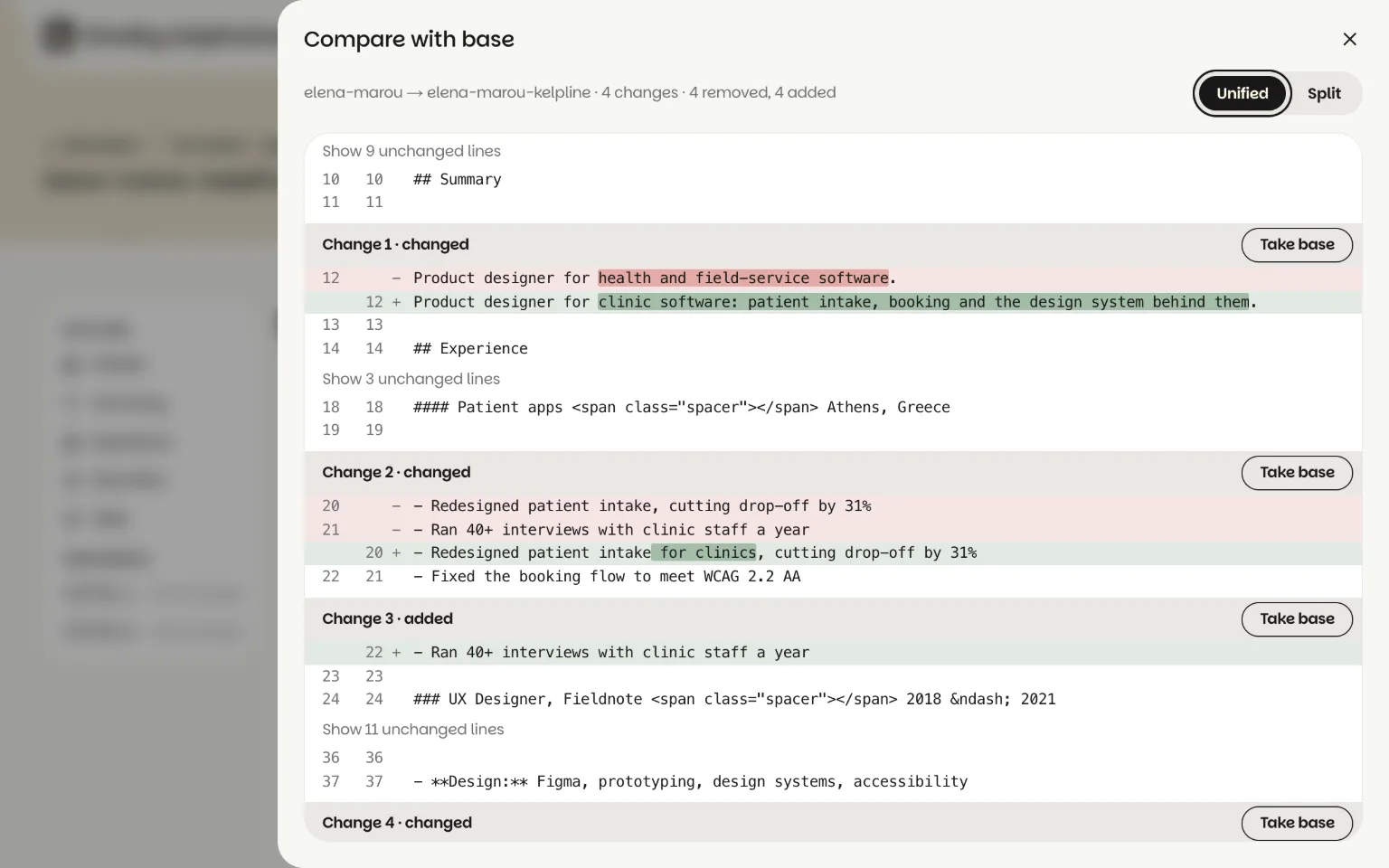
In hiredby.app, Compare with base shows the copy against its base line by line, unified or split, and Take base undoes one change. Each copy is a card on the Applications board, from Draft to Applied, Interview, Offer or Rejected, so you know which version went where.
Then export the copy as a PDF. Exports are free. AI tailoring costs 3 credits a job, and Copy only makes the copy with no AI and no charge: pricing, with no subscription. The tailoring manual goes through each screen. Whether you need a new copy for every job is its own question.
What if you do not meet every requirement?
If you meet the must-haves, apply and leave the gaps off the page: a nice-to-have is optional by name. If you miss a must-have, find the nearest thing you have done and say it in your own words.
Nearest means honest and specific. No Kubernetes, but you ran Docker containers in production? List Docker and write the bullet about running containers. The reader can see the distance and judge it. A skills line that says Kubernetes would fall apart at the first technical question.
The questions in the hiredby.app report are there for this. When a requirement is not found, the report asks you about it in one line. An answer you give can become a line in the tailored copy. A question you skip stays a no, and the requirement stays off the page.
How do you tailor a resume without claiming something untrue?
Only reword, reorder and cut. Every changed line should trace back to something you did and can talk about in an interview, and a requirement you cannot back up stays off the page.
hiredby.app enforces that rule in code, not in a prompt alone. In our writing eval of 2026-11-15 (15 cases, 30 model calls), no output held a number the person had not given, and none held a placeholder like [X]. The same run failed two of its own gates, faithfulness and context recall, so it is a floor, not a clean bill of health.
The check can also be too strict. A code audit found it threw away true lines when a number sat right before a comma, as in "team of 8, shipping 3 releases". We fixed that on 2026-11-14.